> For the complete documentation index, see [llms.txt](https://help.bots.business/llms.txt). Markdown versions of documentation pages are available by appending `.md` to page URLs; this page is available as [Markdown](https://help.bots.business/use-the-mobile-app/chats.md).
# Manage bot chats
Find known bot chats, inspect user properties, and block or unblock chats from the Bots.Business mobile app.
Open your bot → **Chats** to inspect the chats known to that bot. This is useful when one user cannot interact with the bot or when you need to check that user's stored data.
A demonstration chat with Block and Properties actions
## Inspect a user
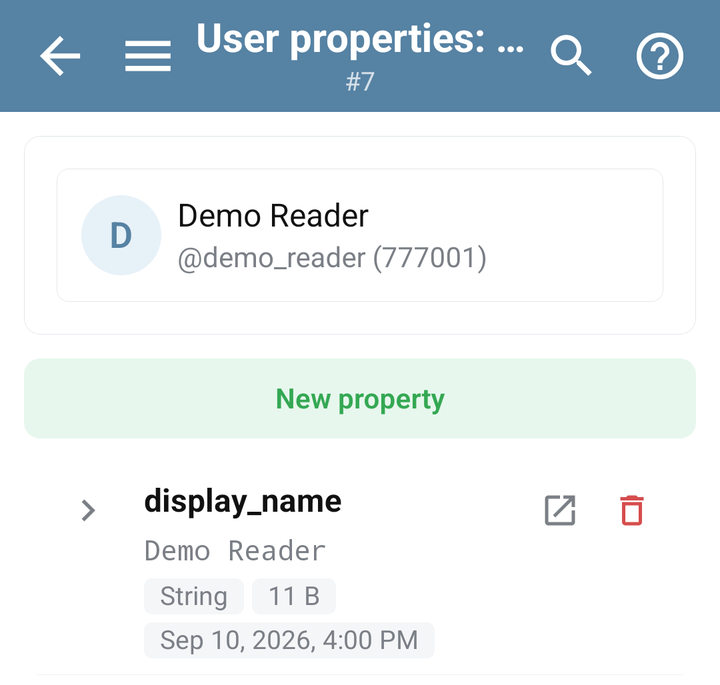
Find the relevant entry and check its name and identifiers. For a user entry, **Properties** opens that user's stored properties in this bot. Telegram identifiers and Bots.Business internal identifiers have different uses; copy the identifier required by the API you are calling.
An empty list can mean that the bot has not yet received an interaction. Test it in Telegram first, then refresh the list. Check the selected bot if an expected chat is missing.
Properties opened for a demonstration bot user
## Block or unblock
Use **Block** on the chat you want the bot to stop handling, or **Unblock** to remove the Bots.Business block. Wait for the result and check the entry's status.
For several chats, select them and use **Block selected** or **Unblock selected**. Review the selection before confirming and inspect any failed items afterward.
Unblocking a chat here cannot reverse a user's decision to block the bot in Telegram. If delivery still fails, inspect the Telegram error or the [broadcast delivery details](/use-the-mobile-app/broadcasts.md).
## Related checks
* A single user has the wrong settings: inspect their [properties](/use-the-mobile-app/properties.md).
* Nobody gets a reply: use [Bot does not reply](/troubleshooting/bot-not-responding.md).
* A bulk message misses recipients: inspect [Broadcast](/use-the-mobile-app/broadcasts.md) and its audience counts.
* BJS needs to block a chat: use the identifier and methods in the [Bot reference](/bjs-reference/bot.md).